


Interactive Well-Being Dashboard Template for Mood and Sleep
Original price was: $18.63.$13.23Current price is: $13.23.
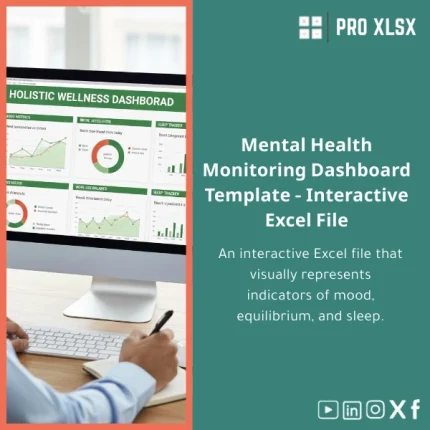
A professional Well-Being Dashboard Template in Excel that turns daily mood, sleep and balance logs into interactive charts, trends and actionable summaries — designed for accountants, data analysts, consultants and companies that need reliable, audit-ready spreadsheets with fast customization options.
Key benefits & value for the buyer
Designed with the precision that accountants and analysts expect, the Well-Being Dashboard Template translates raw daily records into meaningful KPIs: average mood, sleep efficiency, balance score, weekly variance and alert flags. The result is a compact, trusted file that supports reporting, compliance and interventions without heavy software investments.
Benefits translated from features
- Time saved: Pre-built input forms and auto-calculated summaries cut administrative time by up to several hours per month.
- Reliable analysis: Standardized formulas and error-checks reduce data entry mistakes — ideal for audit trails.
- Actionable insights: Visual cues (heatmaps, conditional formatting) make it easy to spot declines in sleep or spikes in low mood.
- Flexible reporting: Export charts and tables to presentations, integrate with existing reporting packs or export clean CSVs.
Use cases & real-life scenarios
Below are practical ways companies and professionals use this well-being tracker template:
- HR & People Analytics: Weekly aggregate reports for wellness programs — anonymize and present trends to management.
- Accountants & Consultants: Combine wellbeing KPIs with operational data to measure productivity correlations.
- Data Analysts: Use the built-in pivot-ready tables to slice by department, location or shift and produce dashboards fast.
- Small clinics / occupational health: Track patient-reported mood and sleep patterns as part of routine checkups.
Example scenario: an accounting firm uses the template to monitor seasonal mood shifts during busy periods, linking sleep scores to overtime hours to propose scheduling changes — the template produces the summary charts for partners in under 10 minutes each week.
Who is this product for?
This Well-Being Dashboard Template is specifically targeted at:
- Accountants and finance teams who need reliable, auditable wellbeing data.
- Data analysts who will integrate wellbeing signals into broader operational models.
- Small to medium companies seeking a low-cost way to run employee wellbeing reports.
- Consultants and HR advisors delivering quick, evidence-based recommendations.
If you need a fast, Excel-native solution that behaves predictably in corporate environments, this template fits well.
How to choose the right template & options
Although this is a single product, choose based on these practical factors:
- Single user vs. team use: If multiple users will edit the file, enable shared network versions or request our hourly customization to add a central data entry sheet.
- Level of automation: Use the basic workbook for manual entry. Purchase the optional VBA automation add-on if you want weekly PDF exports and scheduled summaries.
- Integration needs: If you plan to join wellbeing data with payroll or time sheets, request our one-hour integration service to map columns and set up joins.
- Language & formatting: The template is English by default; localization (Arabic headings, local date formats) is available on request.
Quick comparison with typical alternatives
When deciding between solutions, consider these trade-offs:
- Manual spreadsheets: Cheaper but error-prone and hard to scale. Our template adds integrity checks and standard visuals.
- Dedicated wellbeing apps: Offer mobile convenience but often lack exportable, audit-ready data. This Excel template gives you full data control and easy report export.
- Enterprise BI tools: Powerful but costly and slow to deploy. The template delivers immediate insights with low cost and quick customization.
Best practices & tips to get maximum value
- Keep raw input in the protected input sheet and use the dashboard sheet for all reporting to avoid accidental formula edits.
- Establish a weekly cadence: enter daily records and run the “Week Summary” macro (or manual button) to produce manager-ready charts.
- Use anonymized IDs for employee-level analysis to comply with privacy and to enable department-level aggregation.
- Backup monthly CSV exports to your data lake; this makes it easy to combine with payroll or scheduling data later.
Common mistakes when buying/using similar templates and how to avoid them
- Buying a generic tracker: Many templates lack validation rules; choose one with input checks to prevent bad data.
- Skipping integration planning: If you need to join wellbeing with HR systems, plan mapping during purchase — our hourly service reduces integration rework.
- Ignoring version control: Store the master on a secure server and distribute read-only copies to users.
Product specifications
- Format: .xlsx (Excel workbook)
- Sheets included: Data Input, Daily Logs, Weekly Summary, Monthly Dashboard, Charts, Settings
- Compatibility: Excel for Windows (recommended), Excel for Mac (limited macro support), Office 365/Excel Online (basic functionality)
- Features: interactive charts, conditional formatting, pivot-ready tables, sample data & instructions
- Optional services: hourly customization, VBA automation, integration with payroll/time systems (billed hourly)
- License: commercial use permitted for companies; single file distribution terms included with purchase.
- Support: email support and optional paid customization available through ProXlsx services.
FAQ
Is this template compatible with my version of Excel?
The template works in Excel for Windows and Excel for Mac. Full macro/VBA features are available in Excel for Windows and Office 365 desktop; Excel Online and some Mac versions support core formulas and charts but may not run VBA macros. We can provide a macro-free build on request.
Can I customize the dashboard for our company fields (e.g., department codes)?
Yes. The template is intentionally modular. Minor mapping changes can be done by following the included setup guide. For larger changes we offer hourly customization services to tailor fields, visuals and integrations to your systems.
How does data privacy work—are there user-level protections?
The workbook supports worksheet protection and the use of anonymized IDs. For sensitive deployments we recommend running the tracker on a secure internal share and using anonymized identifiers for reporting. ProXlsx offers guidance on best practices for privacy during purchase.
What if the template doesn’t meet our needs?
We advise testing the sample data and reviewing the dashboard within 7 days. If you need changes, our hourly services can adapt the template quickly. Contact support to arrange custom work before requesting a refund to minimize delays.
Ready to transform mood and sleep logs into management-ready reports?
Purchase a robust, audit-ready Well-Being Dashboard Template built for professionals. If you need integration or custom fields, add our hourly service for fast delivery.
Need help choosing options? Contact ProXlsx for a pre-purchase consultation or request a one-hour customization before you buy.
Related products

Break-Even Analysis Template for Cost and Profit Estimation
A ready-to-use Break-Even Analysis template in Excel to calculate the sales volume needed to cover costs, model profit scenarios, and produce clear management-ready charts and a margin of safety calculator. Designed for accountants, analysts, and companies who need fast, reliable decision support without complex systems.







Reviews
Clear filtersThere are no reviews yet.