


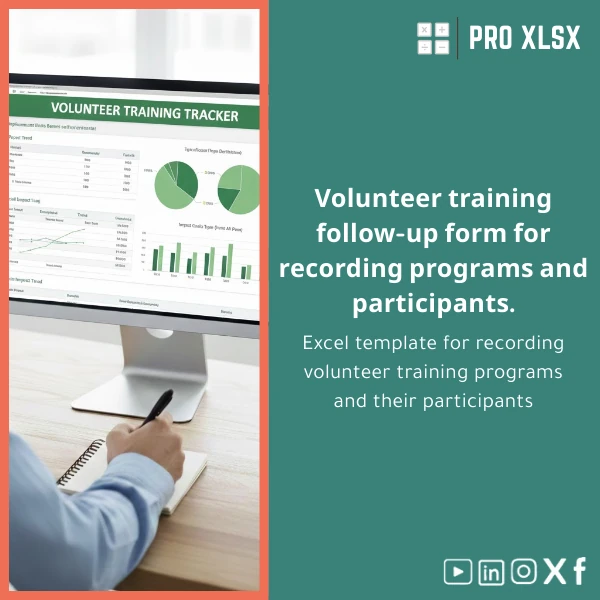
Volunteer Training Tracking Template for Program Registration
Original price was: $18.63.$13.23Current price is: $13.23.
A ready-to-use volunteer training tracking template in Excel that registers programs, participants, and hours — built for accountants, data analysts, and organizations that need accurate, audit-ready volunteer logs and fast operational reports.
Key benefits & value for accountants, analysts, and operations teams
This volunteer training tracking template converts unstructured attendance and training records into reliable datasets you can analyze, reconcile and report. It was designed to remove manual consolidation, reduce human error, and speed up month-end reporting for programs and grants.
What you get — benefits translated into outcomes
- Time savings: pre-built tables and formulas cut registration and reconciliation time by up to 70% in typical implementations.
- Accurate audit trails: timestamped attendance and change logs make internal reviews and donor audits simpler.
- Better reporting: built-in pivot-ready sheets and dashboard summary for quick KPI extraction (hours by volunteer, training type, program).
- Easy integrations: clean, normalized data that exports simply to accounting systems or CSV for BI tools.
Use cases & real-life scenarios
Examples of how organizations use this volunteer training programs register in the field:
Nonprofit with multiple training sessions
Small-to-medium NGOs run weekly training across branches. Staff use the template to register attendees at every session, automatically aggregate volunteer hours for monthly reports, and export totals for the finance team to include in grant claims.
Corporate volunteer program managed by HR
HR teams track employees who attend development workshops and community service days. The template links training completion to certification checklists and flags expired certifications for follow-up.
Accounting & audit preparation
Accountants use the volunteer training log Excel to cross-check payroll-equivalent records (e.g., stipends), attach scanned sign-in sheets, and prepare schedules that reconcile to the general ledger.
Who is this product for?
Designed specifically for:
- Accountants and auditors who need clean, auditable volunteer hour records.
- Data analysts and operations managers who build dashboards and dashboards from volunteer datasets.
- NGOs, community service teams, and corporate CSR departments that run recurring training programs.
- Consultants and service providers who need a standardized register to deploy across clients.
How to choose the right version
We offer the template as a standard Excel file and an optional customized version implemented hourly by ProXlsx specialists.
- Standard template — choose if you need an out-of-the-box register to start immediately. Includes instructions and sample data.
- Customized template (hourly service) — choose if you want: branding, extra fields, VBA automation for imports, or a tailored dashboard. Ideal for multi-site programs or integration with payroll/accounting systems.
Need help deciding? Contact our team — we can review a short brief and recommend the fastest route to production-ready files.
Quick comparison with typical alternatives
How the Excel volunteer training tracking template stacks up against common options:
- Paper forms: slower, error-prone, not searchable. Excel centralizes data and is immediately analyzable.
- Generic spreadsheets: may lack validation, pivot readiness, or print-ready sheets. Our template includes both structure and documentation.
- Cloud platforms: offer collaboration but can be costly and hard to customize for grant reporting. Excel gives you ownership, offline access, and easy export for auditors.
Best practices & tips to get maximum value
- Standardize field inputs: use drop-down lists for training types and sites to keep data clean.
- Enter data regularly: daily or weekly entry prevents backlog and keeps hours accurate for payroll/grants.
- Use the pivot-ready sheets: build monthly dashboards from the provided pivot tables rather than manual aggregation.
- Backup & version: keep a dated backup before bulk imports or automation runs.
- Consider customization: if you have 500+ volunteers or multiple programs, a one-off customization saves time long-term.
Common mistakes when buying/using similar products and how to avoid them
- No validation rules: leads to inconsistent names and duplicate records. Our template includes validation and duplicate-check hints.
- Skipping documentation: users get lost. We include a quick-start guide and sample entries.
- Ignoring integration needs: plan your exports (CSV, XLSX) and mapping before mass data entry — we can assist with mapping as an hourly service.
Product specifications
- Format: Excel (.xlsx). Optional .xlsm version available with VBA snippets.
- Compatibility: Microsoft Excel 2016 or later (Windows & Mac), Excel for Microsoft 365. Works with LibreOffice with limited features.
- Sheets included: Registration, Session Schedule, Attendance Log, Volunteer Directory, Hours Summary, Pivot Dashboard, Printables (sign-in and certificates).
- Features: Data validation, conditional formatting, calculated fields for hours, pivot-ready tables, printable templates.
- Custom services: hourly customization, data entry, VBA automation, and report design available on request.
- Delivery: immediate digital download after purchase; customization timelines quoted per project.
- Support: email support for installation and basic setup; paid hourly support for advanced customization.
Frequently asked questions
Is this template compliant with grant reporting needs and audits?
Yes. The template produces structured records with timestamps, session IDs, and signed attendance printouts that satisfy typical grant and audit requirements. For specialized audit formats we offer customization services to match your templates.
Will this work for multi-branch organizations?
Yes. The template includes site/branch fields and aggregation logic. For complex multi-branch rollups or central imports, we recommend our hourly customization to add automated consolidation.
Can I import historical volunteer hours from other systems?
Yes. The template is designed to accept CSV imports. If you have large legacy data, ProXlsx offers data-cleaning and import services billed hourly to map and validate records before insertion.
What if I need automation (e.g., email reminders, bulk certificates)?
Automation is available via VBA in the .xlsm version or as a custom deliverable. We can build mail-merge certificate generation, reminder emails, and auto-summary exports on an hourly basis.
What support is included after purchase?
Standard purchase includes a quick-start guide, sample data, and email support for installation issues. Extended setup, training, or custom development are available as paid services.
Ready to standardize volunteer training records?
Download the Volunteer training tracking template now and get structured registration, reliable volunteer hours tracking sheet outputs, and audit-ready reports. If you need customization, our ProXlsx team can implement changes hourly — fast and professionally.
Prefer customization first? Contact us after purchase or request an hourly quote for tailored setup, data import, or automation.








Reviews
Clear filtersThere are no reviews yet.