



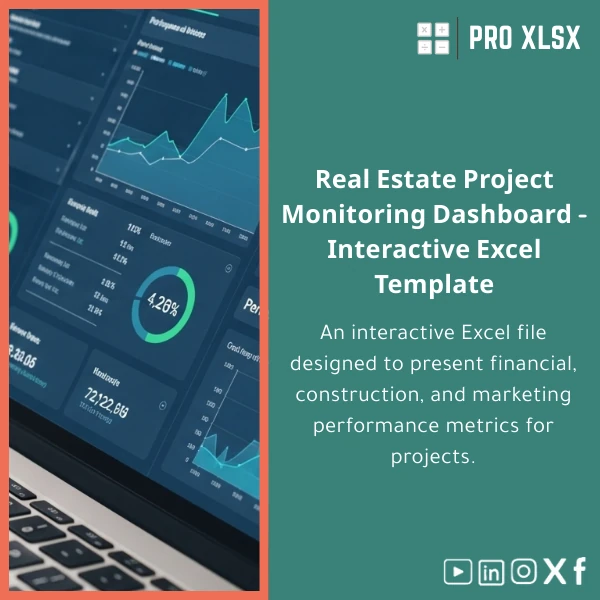
Real Estate Dashboard Template for Projects & KPIs
Original price was: $94.23.$75.33Current price is: $75.33.
Interactive Dashboard — Financial, Construction & Sales KPIs. A ready-to-use Excel solution that turns project data into a single interactive view for project managers, accountants and analysts — fast setup, fully editable, and supported by ProXlsx hourly services.
Key benefits & value for accountants, analysts and project teams
The Real Estate Dashboard combines financial modelling, progress tracking and sales monitoring into one Excel file. It saves time, reduces spreadsheets fragmentation and speeds decision-making with clear KPIs and visual controls.
What you get in practical terms
- Faster month-end reporting: pre-built consolidation sheets and dashboards cut manual reconciliation time.
- Clear project performance: Cost-to-complete, earned value snapshots, and milestone variance in one view.
- Actionable sales insights: sales funnel, reservations vs contracts, and revenue recognition triggers.
- Secure, offline-ready: Excel file you control — no third-party hosting or recurring BI subscriptions.
Use cases & real-life scenarios
Below are typical scenarios where the Real Estate Dashboard adds immediate value:
Construction project manager
Use the dashboard to monitor timeline slippages, compare planned vs actual spend per work-package, and pull weekly site reports for stakeholders without recreating charts.
Accountant or financial controller
Consolidate subcontractor invoices, run cashflow forecasts with scenario toggles (delays, currency changes) and produce board-ready KPI snapshots in minutes.
Sales & marketing head for property development
Track leads, reservations, and sales conversion rates across projects, measure sales pipeline velocity, and align incentives to targetable KPIs.
Who is this product for?
The template is designed for:
- Accountants and auditors preparing project financial statements and variance analysis.
- Data analysts and BI specialists who need a lightweight, Excel-native dashboard for rapid prototyping.
- Real estate developers and construction firms seeking consolidated operational and financial KPIs without new software purchases.
- Consultants and project controllers delivering client-ready reports quickly.
How to choose the right version
The Real Estate Dashboard is offered in versions to match your scale and Excel environment:
- Basic (single project) — clean layout, no VBA, ideal for accountants who prefer formula-only templates.
- Professional (multi-project) — includes consolidation, scenario toggles and interactive slicers (Excel 2016+ recommended).
- Automated (with VBA) — scheduled refresh, import routines and one-click PDF export for recurring reports (requires macro-enabled Excel).
Choose based on the number of projects, need for automation, and your team’s Excel version. If unsure, ProXlsx offers an assessment by the hour to recommend the right package.
Quick comparison with typical alternatives
Consider these trade-offs when evaluating the template versus other options:
- Excel Dashboard vs Custom BI tool: Faster to deploy, lower cost, full ownership — less suited for real-time multi-user publishing.
- Template vs bespoke consultancy: Template is immediate and affordable; consultancy adds customization at an hourly rate from ProXlsx when needed.
- Excel vs cloud CRMs/ERPs: Better control of formulas and privacy; needs manual integration for live transactional feeds unless automated by VBA or Power Query.
Best practices & tips to get maximum value
- Standardize data input: use the provided data templates to avoid broken formulas.
- Use the “Demo” sheet to understand KPI calculations before connecting live data.
- Save a master copy and work on copies when testing scenarios.
- Consider ProXlsx hourly implementation to map your own chart of accounts and integrate export files automatically.
Common mistakes when buying or using dashboards — and how to avoid them
- Buying before assessing data quality: Validate your source files first. ProXlsx can run a short audit to ensure compatibility.
- Expecting real-time multi-user collaboration: Excel is not a live BI server — for multi-user workflows, combine with shared drives or Power BI exports.
- Over-customizing without backups: Keep an untouched master file; request ProXlsx modifications if you need structural changes.
Product specifications
- File format: .xlsx (macro-free options) and .xlsm (macro-enabled version available)
- Compatibility: Excel 2016, Excel 2019, Excel for Microsoft 365 (some interactive features require modern Excel)
- Included sheets: Dashboard (overview), Financials, Cashflow forecast, Construction progress, Sales & pipeline, Raw data, User guide
- Languages: English interface; support and implementation in Arabic available from ProXlsx (Egypt-focused)
- Deliverables: downloadable file, PDF user guide, sample dataset, optional hourly customization
- Support: email support and paid hourly implementation for data mapping, VBA automation and custom reports
FAQ
Is the dashboard compatible with Arabic financial formats and Egyptian accounting charts?
Yes. The template uses Excel tables and flexible mappings so you can adapt account codes and date formats. ProXlsx offers a short hourly service to map your chart of accounts and localize the template for Egyptian standards.
Do I need Excel 365 to use interactive slicers and timeline features?
Most features run on Excel 2016 and newer. Slicers and timeline visuals work in Excel 2016+, but advanced dynamic arrays and some newer functions are best on Excel for Microsoft 365. A macro-free version is provided where appropriate.
How secure is my data when using this template?
The dashboard is an offline Excel file you host. No external servers are required. If you request ProXlsx implementation services, you can supply data securely, and we follow standard confidentiality practices for client data.
Can you customize the template for multiple projects and different currencies?
Yes. The Professional and Automated versions support multi-project consolidation and multi-currency scenarios. ProXlsx offers hourly customization to add currency conversion, consolidation rules, or client-specific KPIs.
Ready to simplify project reporting?
Download a professional Real Estate Dashboard that accountants and analysts can deploy today. If you need setup help, ProXlsx provides quick implementation by the hour to map your data and automate imports.
Buy this template now
— Instant download & user guide. Need custom work? Contact ProXlsx after purchase for hourly support.







Reviews
Clear filtersThere are no reviews yet.