




Daily Healthy Habits Management Template for Sleep and Diet
Original price was: $18.63.$13.23Current price is: $13.23.
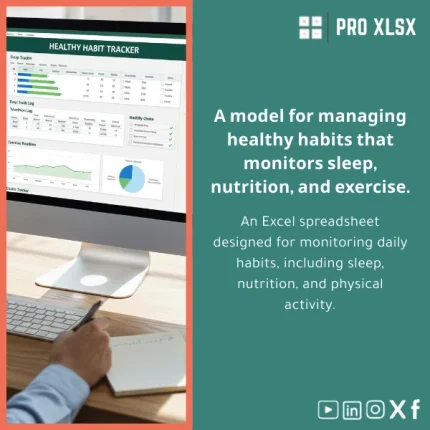
A professional Healthy Habits Management Template built in Excel to log sleep, diet, and activity in one structured workbook — designed for accountants, data analysts, and companies that need accurate daily habits tracking as part of operational or wellbeing reporting.
Key benefits & value for buyers
The Healthy Habits Management Template converts daily entries into structured data you can analyze like any other business metric. Rather than manual sheets or ad-hoc logs, this template gives you:
- Reliable, audit-friendly records: Tables and timestamps that accountants and auditors will accept as source data.
- Fast analysis: Build pivot tables, create visual dashboards, and quantify correlations between habits and performance or absence costs.
- Consistency across users: Standardized fields (sleep hours, meal quality, activity minutes) remove ambiguity in data collection.
- Immediate insights: Weekly summaries, trend lines, and compliance scores surface problems early — no manual consolidation needed.
- Scalable for teams: Use departmental tags to roll up individual logs into organizational reports.
Use cases & real-life scenarios
For accounting and finance teams
Correlate employee wellbeing data with productivity or absenteeism. Export daily logs to CSV and merge with HR or time-sheet systems to quantify the financial impact of sleep and diet patterns.
For data analysts
Use the template as a clean source table for time-series analysis. Fields are ready for Power Query, pivot models, and simple regression tests to explore relationships between activity levels and performance metrics.
For companies running wellness programs
Track participation and compliance, generate weekly reports for management, and identify groups that need targeted interventions — all without additional software.
Who is this product for?
The template is aimed at professionals who need structured, reliable habit tracking within Excel workflows:
- Accountants and controllers who include wellbeing KPIs in operational reports.
- Data analysts building cross-functional datasets that include health inputs.
- HR teams and managers implementing low-cost wellness monitoring.
- Consultants and auditors who need clean, export-ready logs for engagements.
How to choose the right version
There are three recommended ways to get started depending on your needs:
- Download the standard template if you need an immediately usable workbook for one user or a small team.
- Request minor customization (hourly service) to add columns, localize labels to Arabic/English, or map fields to your payroll or HR export.
- Full implementation when you want automated imports, VBA-based summary reports, or a corporate dashboard integrated with your internal systems.
Not sure which fits? Choose the standard template and add hourly support later — ProXlsx keeps your workbook modular so upgrades are quick.
Quick comparison with typical alternatives
- Paper or ad-hoc sheets: Hard to consolidate, error-prone. Our template standardizes entries and reduces reconciliation time.
- Online habit apps: Good for individuals but usually locked in and poor for team-level exports. This Excel template stays within your data governance and reporting processes.
- Custom software: Expensive and slow to deploy. The template delivers immediate value at a fraction of the cost and can be automated later if required.
Best practices & tips to get maximum value
- Define required fields before deployment (e.g., user ID, date, sleep hours, meal quality, activity minutes).
- Use data validation lists to prevent inconsistent entries (meal quality: Excellent / Good / Poor).
- Schedule a weekly export and pivot refresh to produce management reports without manual copying.
- Protect key formula cells and provide a “data entry” sheet to reduce accidental changes.
- Use ProXlsx hourly services to implement macros that automate report generation if you need repeatable outputs.
Common mistakes when buying or using similar templates — and how to avoid them
- Buying a template that isn’t structured for analytics: Choose templates with normalized tables and timestamps — like this one — not flat sheets with merged cells.
- Underestimating governance: Assign an owner to maintain the template and controls to protect formulas.
- Skipping export planning: If you plan to merge these logs with other systems, set export formats and column names from day one.
Product specifications
- Format: Microsoft Excel workbook (.xlsx). Optional .xlsm for macro-enabled automation.
- Compatibility: Excel 2016 and later (Windows & Mac). Power Query friendly.
- Included sheets: Daily Log, Weekly Summary, Dashboard, Lookup Tables, Export (CSV-ready).
- Features: Conditional formatting, calculated compliance score, pivot-ready tables, printable weekly report.
- Localization: English labels; Arabic labeling option available via customization service.
- Support: Documentation + 30-minute setup guide. Hourly customization and VBA automation available.
- Delivery: Instant digital download after purchase.
Frequently asked questions
Is this template suitable for team-wide tracking and roll-ups?
Will this work with Power Query and dashboards?
Do I need the macro-enabled version?
How secure is the data inside the template?
Ready to standardize daily habit tracking?
Purchase the Healthy Habits Management Template now and get an analytics-ready workbook that integrates with your Excel workflows. If you want customization, add ProXlsx hourly services after purchase to localize fields, add macros, or integrate with your HR systems.








Reviews
Clear filtersThere are no reviews yet.