




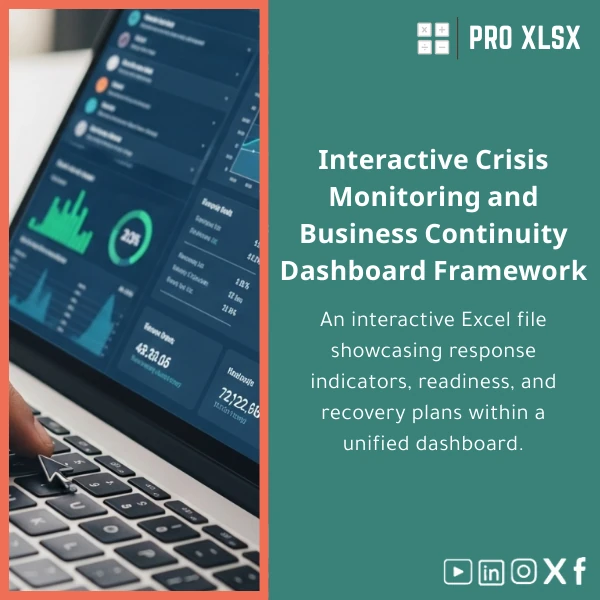
Crisis Dashboard Template for Business Continuity Planning
Original price was: $94.23.$75.33Current price is: $75.33.
Interactive Excel file to display readiness, response, and recovery indicators in one dashboard — built for accountants, data analysts, and operations teams who need a practical, fast way to monitor emergency response KPI tracker, run scenario checks, and produce stakeholder-ready reports without heavy systems.
Key benefits & value for buyers
The Crisis Dashboard Template transforms scattered incident logs, readiness checklists, and recovery plans into actionable intelligence. Instead of manual aggregation, you get:
- Faster decision cycles: Visual KPIs and color-coded statuses let leadership identify critical gaps in minutes, not hours.
- Audit-ready reporting: Export printable reports tailored for auditors, compliance teams, or board briefings.
- Reduced workload: Automated calculations and pre-built logic lower repetitive tasks for accountants and analysts.
- Cost-effective analytics: Use Excel you already have — avoid expensive specialized continuity platforms.
- Scalable & editable: Add new KPIs, link to external data, or request customization from ProXlsx’s hourly service team.
Use cases & real-life scenarios
Daily monitoring for continuity teams
Operations teams use the template every morning to confirm system readiness (backup status, staff availability, vendor SLAs) and escalate items that fall below thresholds.
Incident response & status briefings
During an incident, the template becomes the single source of truth: timeline, response actions, resources assigned, and recovery progress are visible and timestamped for debriefs and insurance claims.
Finance & audit integration
Accountants connect financial exposure models to recovery timelines to estimate operational loss and validate reserves. The template’s consistent structure simplifies reconciliations and audit trails.
Who is this product for?
This Crisis Dashboard Template is aimed at professionals and organizations that need reliable, Excel-native business continuity dashboard Excel solutions:
- Accountants and controllers who must quantify loss and support continuity budgets.
- Data analysts needing an emergency response KPI tracker that fits into existing reports and BI pipelines.
- SMEs and corporate continuity teams that require rapid deployment without new software procurement cycles.
- Consultants and auditors preparing continuity assessments for clients.
How to choose the right template & options
Pick the configuration that matches your technical environment and process:
- Standard (no macros): Use if you need maximum compatibility (Excel Online, Google Sheets import). Manual refresh for linked tables.
- Advanced (with macros/VBA): Best when you want scheduled exports, single-click report generation, or automated data cleaning (requires Excel desktop).
- Custom package: Order ProXlsx hourly support to map your existing data, add bespoke KPIs, or integrate the dashboard into your internal reporting routine.
Need help deciding? Choose a short customization session from ProXlsx to confirm fit before purchase.
Quick comparison with typical alternatives
Compared to ad-hoc spreadsheets: this template is structured, validated, and audit-ready (fewer errors, consistent KPIs). Compared to enterprise continuity software: you gain lower cost, full Excel control, and faster deployment, while trading off cloud-native collaboration and multi-user locking unless combined with your existing file-sharing tools.
Best practices & tips to get maximum value
- Standardize input sheets — use the provided import sheet to align vendor, location, and asset names before loading data.
- Set realistic thresholds — configure alert levels in the settings tab and document who should be notified for each alert.
- Schedule a weekly review — run the dashboard with the latest operational data and attach the PDF export to your continuity minutes.
- Use ProXlsx’s hourly service for initial setup — mapping your source data once saves many hours of rework.
Common mistakes when buying or using similar templates — and how to avoid them
- Buying without sample data: Always test with a subset of your real data. ProXlsx provides a sample dataset to validate outputs before full adoption.
- Ignoring Excel version limits: Macros require Excel desktop. Choose the non-macro version if your team uses Excel Online only.
- Overloading the dashboard: Start with core KPIs (readiness, response time, recovery progress) and add complex models after processes stabilize.
Product specifications
- File type: .xlsx (standard) / .xlsm (optional with macros)
- Compatibility: Excel 2016 and later (desktop recommended for macros); basic viewable in Excel Online
- Included sheets: Dashboard, Raw Data Import, KPI Config, Incident Log, Recovery Plan, Printable Report
- Key features: Interactive filters, conditional formatting, timeline visual, KPI thresholds, export to PDF
- Automation: Optional VBA module for scheduled exports and one-click reporting
- Documentation: In-file guidance and a quick-start PDF
- Support: 30 days email support + ProXlsx hourly customization packages
- Licensing: Single company license with an option for consultancy and deployment services
- Usage notes: Back up your files before running macros. For multi-user editing, manage via your file-server or SharePoint while being aware of Excel locking behavior.
Frequently asked questions
Can I use the dashboard without VBA or macros?
Yes. A standard version is provided with full dashboard functionality using formulas and pivot tables. Macros are optional and only required for automated exports or scheduled tasks.
Will it work with my existing incident logs and finance data?
Most likely yes — the import sheet accepts CSV or copied ranges. If your naming conventions differ, ProXlsx offers an hourly mapping service to align your data and automate imports.
Is the template suitable for audits and regulatory reporting?
Yes. The template maintains a clear data trail, timestamped incident entries, and printable reports designed to meet internal audit needs. For compliance with specific regulations, request a customization session.
How do I get help with customization or deployment?
ProXlsx provides time-based services (hourly) for customization, VBA development, or full data integration. Contact us after purchase to schedule the required hours.
Ready to simplify your continuity reporting?
Download a practical, audit-ready Crisis Dashboard Template that works with the Excel tools your team already uses. If you need customization, ProXlsx offers fast, hourly support to implement KPIs, connect your data, and provide staff training.
Purchase includes documentation, sample data, 30 days email support, and options for paid customization.








Reviews
Clear filtersThere are no reviews yet.