



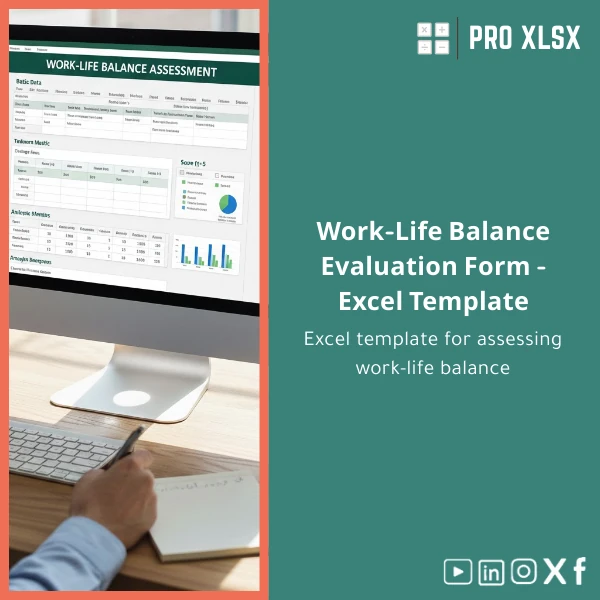
Work-Life Balance Evaluation Template for Self-Assessment
Original price was: $37.53.$26.73Current price is: $26.73.
A ready-to-use Work-Life Balance Evaluation Template built in Excel to help accountants, data analysts and business teams measure employee wellbeing, convert responses into actionable scores, and integrate insights into financial and operational reports — fast.
Key benefits & value for accountants, analysts and companies
This Work-Life Balance Evaluation Template is built to deliver measurable outcomes you can trust. Where many “survey” spreadsheets stop at raw responses, this template:
- Produces a standardized Work-Life Index per employee and aggregate scores by team, department, or cost center — ideal for cross-functional reporting.
- Links wellbeing indicators to operational metrics: overtime hours, absenteeism, and productivity proxies you already track in Excel.
- Includes conditional formatting, pivot-ready tables, and ready-made charts so you can present findings without rebuilding visuals.
- Offers optional VBA macros to automate data imports, score calculations, and PDF report exports — saving time for busy finance and HR teams.
In short: turn subjective responses into objective, auditable metrics you can use in budgets, risk registers, and management dashboards.
Use cases & real-life scenarios
Monthly employee wellbeing check for small finance teams
An accounting firm runs a 10-question employee work-life assessment each month. Use this template to collect answers, compute individual scores, and highlight staff at risk of burnout. Outputs feed directly into your monthly HR report and help estimate potential overtime cost increases.
Integrate wellbeing into cost projections
A retailer’s operations analyst links rising work stress scores to increased turnover and training costs. The template’s scoring and pivot tables make it simple to model the financial impact of improved scheduling or remote-work policies.
Pre-audit readiness and documentation
For external auditors and compliance teams, the template keeps a clear trail: timestamps for survey rounds, scoring logic visible in formulas, and printable reports for management review.
Who is this product for?
The template is specifically designed for:
- Accountants and internal finance teams who need to include wellbeing metrics in payroll forecasting or cost-of-illness calculations.
- Data analysts and HR analysts who want a structured, repeatable employee work-life assessment form with clean outputs for dashboards.
- Small-to-medium businesses in Egypt and similar markets looking for a low-cost, Excel-based work stress evaluation tool before investing in SaaS platforms.
If you need a turnkey Excel solution to measure, report, and act on work-life data without learning new systems, this template fits.
How to choose the right template & customization options
Choose this template if you require:
- Excel-native files (.xlsx) you can host locally or on company OneDrive.
- Built-in scoring logic and ready charts — minimal setup required.
- Optional hourly support from ProXlsx for data imports, localization (Arabic/English labels), or VBA automation.
Need deeper integration (HRIS, payroll systems)? Order a customization session from ProXlsx and we’ll map fields, automate imports, or convert outputs into your existing dashboard format.
Quick comparison with typical alternatives
Alternatives include manual forms, online survey tools, or enterprise HR platforms. Compared to those:
- vs manual spreadsheets: this template saves time with tested formulas, scoring and visuals — fewer errors.
- vs online survey tools: you keep full control of data locally and avoid subscription fees while gaining analytics-ready outputs.
- vs enterprise platforms: lower cost and faster implementation; ideal when you need results in days, not months.
If you expect high-frequency, organization-wide surveys with advanced analytics, consider starting with this template and outsourcing any heavy integration to ProXlsx hourly services.
Best practices & tips to get maximum value
- Use consistent question phrasing and a fixed scoring scale (the template uses a 1–5 scale by default).
- Collect at least monthly data to spot trends; use the template’s trend charts to flag changes early.
- Map one or two operational KPIs (overtime hours, absenteeism) to see direct correlations with the Work-Life Index.
- Keep the master file protected and distribute a copy for data entry if multiple collectors are used; then consolidate using the template’s import sheet.
Common mistakes when buying/using similar templates — and how to avoid them
- Buying a visually complex template that lacks clear formulas — choose templates with transparent scoring logic (this product shows formulas clearly).
- Expecting full automation without setup — plan 1–2 hours for initial configuration per department.
- Over-customizing before validating the questions — start with the default questionnaire, validate one cycle, then customize.
Product specifications
- File format: .xlsx (Excel workbook)
- Sheets included: Instructions, Survey Data Entry, Scoring Engine, Team Dashboard, Charts & Print Report, Import/Export
- Compatibility: Excel 2016, Excel 2019, Office 365 (desktop recommended for full VBA features)
- Languages: English (labels easily editable for Arabic translation)
- Automation: Optional VBA macros for import/export and PDF reporting (disabled by default for security)
- Delivery: Instant download after purchase; optional hourly customization available via ProXlsx services
- Usage notes: Keep backups; enable macros only when running signed or verified scripts
FAQ
Can I integrate the template with our payroll or HR system?
Yes. The template supports import/export via CSV and can be customized to match field mappings. ProXlsx offers hourly services to create the connectors or automate data transfers with VBA or simple scripts.
Is the scoring methodology auditable?
Absolutely. All scoring formulas are visible in the Scoring Engine sheet. You can adjust weights, add new criteria, or lock cells while keeping a clear audit trail for reviewers.
Which Excel versions work with the file? Are macros required?
Core features (data entry, scoring, charts) work on Excel 2016 and later, including Office 365. Macros are optional and only needed if you want automated import/export or scheduled PDF report generation.
How fast can I get custom changes from ProXlsx?
ProXlsx provides hourly execution services. Small changes typically start within 24–48 hours depending on workload. For a cost estimate, provide a short brief and sample data.
Ready to measure employee wellbeing and convert results into actionable insights?
Download the Work-Life Balance Evaluation Template and start getting measurable, presentation-ready results today. If you prefer hands-off setup, order a customization hour and we’ll tailor the template to your reports.
Related products

Excel Cash Flow Template for Tracking Inflows and Outflows

Excel Cost Center Analysis Template for Allocation & Reporting

Excel Payroll Calculation Template for Deductions and Taxes

Expense Control Template for Tracking Expenses in Excel

Flexible Budgeting Template for Excel Analysis

Indirect Manufacturing Costs Allocation Template in Excel

Interest Calculation Template for Excel with Cash Discounts
An Excel-ready interest calculation template that computes simple and compound interest, generates early‑payment cash discount schedules, and converts those results into clear reports and cashflow tables — built for accountants, data analysts, and finance teams who need reliable, fast answers without custom development.


Reviews
Clear filtersThere are no reviews yet.