


Daily Mood Tracker Guide and Template
Original price was: $15.93.$13.23Current price is: $13.23.
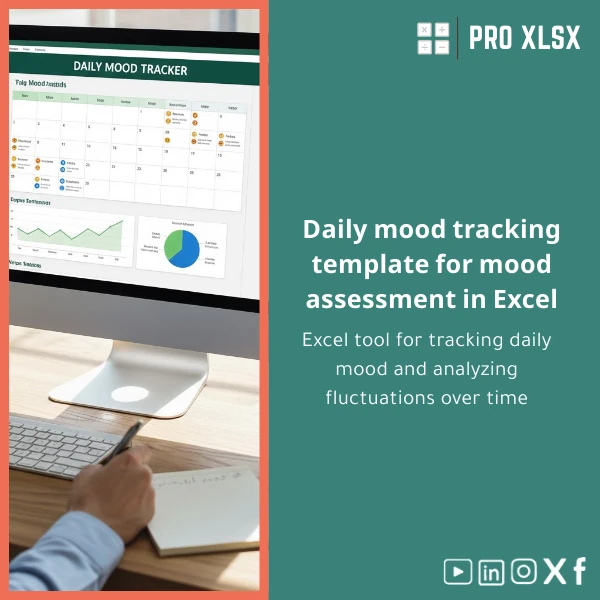
A professional Daily Mood Tracker built in Excel to log moods consistently, visualize trends, and integrate with operational or financial data — designed for accountants, data analysts, HR teams, and consulting firms that need reliable, privacy-friendly mood tracking and trend analysis.
Key benefits & value for accountants, analysts and managers
The Daily Mood Tracker converts subjective day-to-day notes into structured, analyzable data. For teams that already use Excel for reporting, this template removes friction: enter daily scores and comments, then use ready-made dashboards or export clean data to combine with HR, operations, or financial datasets.
What it delivers in practice
- Rapid insights: Visualize weekly and monthly mood trends without building charts from scratch.
- Integration-ready: Data layout follows best practices for pivot tables and Power Query import.
- Decision support: Correlate mood trends with workload indicators, overtime, or sales cycles to make operational changes.
- Minimal setup: Use the template out-of-the-box or request ProXlsx hourly services to tailor fields, visuals, or automation.
Use cases & real-life scenarios
Below are concrete examples that show how the daily mood tracker template adds value:
- Accounting firm: Track staff mood across busy periods (e.g., month-end, audit season) to plan rotations and reduce burnout.
- Data team: Combine mood journal spreadsheet entries with release schedules to identify stress points tied to deployments.
- HR / People Ops: Aggregate anonymous mood trends to support wellbeing initiatives and measure program impact.
- Consultants & therapists: Use the template as a client-facing tool to document progress and export reports for case reviews.
- Small companies: Lightweight alternative to expensive wellbeing platforms; keeps sensitive data on-premise.
Who is this product for?
The Daily Mood Tracker is designed for professionals who require reliable, analyzable mood data rather than consumer-focused journaling apps:
- Accountants and finance teams wanting to correlate mood with workload.
- Data analysts who need a tidy dataset for statistical analysis.
- HR managers and small-business owners tracking team wellbeing.
- Consultants or therapists who prefer an Excel-based mood tracking template for client records.
How to choose the right template options
Think of selection as choosing structure and scope:
- Time span: Daily, weekly, or yearly view — select the template version matching reporting cadence.
- Single vs multi-user: Choose single-user files or a consolidated workbook for team aggregation.
- Automation needs: If you want macros (automatic exports, scheduled backups, or complex chart updates), pick the .xlsm option or request ProXlsx hourly automation.
- Language & regional settings: Arabic/English labels, date formats, and currency compatibility are available on request.
- Privacy controls: Add sheet protection or lock sensitive notes — we can configure this during setup.
Quick comparison with typical alternatives
How this template stacks up against common options:
- Paper journals: Easier to analyze and share; no transcription required and consistent structure for reporting.
- Mobile apps: Apps capture frequent entries but often lack exportable, analyst-friendly data formats.
- Custom BI dashboards: Powerful but costly and complex; this Excel-based mood tracking template gives fast insights with low setup cost.
Best practices & tips to get maximum value
- Use a consistent numeric scale (we recommend 1–10) and mapping to descriptive states to enable math on mood scores.
- Log context tags (e.g., “deadline”, “meeting”, “leave”) — these keys make grouping and filtering meaningful in pivots.
- Schedule a weekly review; export the raw CSV for deeper analytics or machine learning experiments.
- Link mood data to operational KPIs (hours worked, project phases) to demonstrate cause-and-effect for management.
- Use the built-in dashboard for quick snapshots and the raw table for rigorous statistical analysis.
Common mistakes when buying or using mood tracking templates and how to avoid them
- Inconsistent logging: Encourage a short daily habit — even a single number is useful. Automate reminders if needed.
- Overly complex categories: Start with a simple scale and 3–5 tags; expand only when patterns justify it.
- Ignoring privacy: Store sensitive files securely and use anonymization for aggregated reports.
- Expecting instant fixes: Mood data reveals trends — use it to inform changes, not to replace human conversations.
Product specifications
- Format: .xlsx or .xlsm (macro-enabled) – choose at download.
- Compatibility: Excel 2016, 2019, 2021, and Microsoft 365 on Windows and macOS (macros limited on some Mac versions).
- Sheets included: Daily log, Dashboard, Pivot-ready Table, Sample data, Documentation & setup guide.
- Features: Conditional formatting, pre-built charts (trend, heatmap, weekly averages), pivot layout, export-to-CSV button (macro version).
- Support: Setup guide included; optional hourly customization and data-integration services via ProXlsx.
- Privacy: Local file ownership; optional anonymization templates for aggregated reporting.
Frequently asked questions
Can I combine the mood data with payroll or project data?
Yes. The template uses a normalized, pivot-ready table so you can join or merge the mood dataset with payroll, time-sheets, or project logs using Excel Power Query or simple VLOOKUP/XLOOKUP formulas.
Is the template suitable for multiple employees in one file?
Yes. There is a team consolidation layout. For larger organizations we recommend an anonymized aggregate view and optional workbook locking; ProXlsx can configure role-based sheets during a short customization session.
Does the macro option work on macOS?
Macros (.xlsm) work on many Mac Excel versions, but some automation may be limited. If you need mac-specific automation we can provide guidance or a non-macro alternative.
What if I need a custom field or a dashboard change?
ProXlsx offers hourly implementation services to customize fields, visuals, or automations. Many customers order a 1–2 hour customization to match internal reporting standards.
Ready to start logging and analyzing mood trends?
Download the Daily Mood Tracker template now and get the structure analysts trust — plus optional ProXlsx support to integrate it with your existing reports.
Need customization? After purchase, contact ProXlsx for hourly services: template translations, VBA automation, or dashboard integration.








Reviews
Clear filtersThere are no reviews yet.