



Excel Risk Assessment Matrix Template for Effective Risk Management
Original price was: $42.93.$32.13Current price is: $32.13.
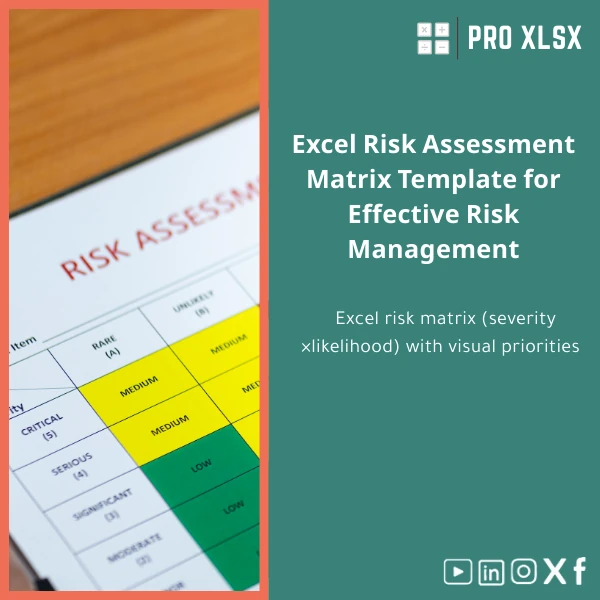
A ready-to-use Risk Assessment Matrix that scores and visualizes severity × likelihood, produces a live risk register and controls tracker, and exports clean reports — built for accountants, data analysts and companies that need fast, auditable risk assessments in Excel.
Key benefits & value for accountants, analysts and managers
The core value of this Risk Assessment Matrix is speed and clarity. Instead of building spreadsheets from scratch, you get a structured workbook that converts qualitative assessments into quantifiable outputs. That means faster audits, clearer management reports, and fewer manual errors when maintaining a risk register.
Features translated into outcomes
- Matrix with automatic scoring: reduces subjective ranking and standardizes risk levels across teams.
- Integrated risk register and controls template: link risks to controls, track mitigation progress, and show residual risk — useful for external auditors and regulators.
- Conditional formatting & dashboard: quick visual cues for escalation and monthly reporting.
- Flexible import/export: works with CSV, Excel extracts from ERP, or direct manual entry — lowers implementation time to under an hour.
- Lightweight and portable: no server, no subscription — fits existing Excel-based workflows common in Egyptian SMEs and accounting firms.
Use cases & real-life scenarios
Monthly internal audit cycle
Accountants can import controls and exceptions from the prior month, run updated likelihood estimates, and produce a dashboard for the audit committee. The matrix highlights the top 10 risks automatically and generates a printable summary for minutes.
Project risk assessment for finance systems
Project managers estimate technical and financial risks during deployment. Use the template to assign risk owners, set mitigation tasks, and calculate residual risk after controls — enabling secure sign-off before go-live.
Operational risk & loss events
Capture operational incidents, map them to control effectiveness, and prioritize corrective actions. The register-and-controls template keeps a transparent trail for compliance reviews and insurance documentation.
Who is this product for?
This Risk Assessment Matrix is designed for:
- Accountants and audit teams who need standardized risk scoring in their audit workpapers.
- Data analysts and financial controllers who need to convert raw incident data into prioritized action lists.
- Small and medium enterprises seeking an affordable way to implement risk governance without complex tools.
- Consultants who deliver plug-and-play risk assessments and client-ready reports.
How to choose the right template version
We provide flexible configurations so you buy only what you need:
- Standard (single workbook): best for small teams needing a simple matrix, register and reporting sheet.
- Advanced (multiple sheets + dashboard): includes monthly trend charts, pivot-driven summaries and printable board report templates.
- Customizable (editable macros & mapping): for teams that require import automation or advanced residual risk logic — ideal if you expect to integrate with ERP extracts or require VBA automation.
Choose Standard if you want immediate use without macros, Advanced for richer dashboards, and Customizable for automation and heavy data import scenarios.
Quick comparison with typical alternatives
Compared to building in-house or adopting heavy GRC systems, this Risk matrix Excel download offers:
- Faster setup: deploy in hours versus weeks for custom builds.
- Lower cost: one-time template purchase rather than expensive licenses.
- Control: full ownership of files and offline usage — no vendor lock-in.
If you need enterprise integration, a GRC platform might be appropriate; if you need speed, clarity and audit-ready outputs, the template is the practical choice.
Best practices & tips to get maximum value
- Start with a short workshop: align definitions for likelihood and severity with stakeholders to ensure consistent scoring.
- Import existing incidents: use the import mapping tab to prevent manual re-keying and save time.
- Keep the control owner column current: short weekly updates maintain the register’s usefulness in decision meetings.
- Use the printable dashboard for monthly board packs — keep executive summaries to one page.
- When using the customizable version, test macros on a copy before running on production data.
Common mistakes when buying or using risk templates — and how to avoid them
- Mistake: Buying a template and not standardizing scoring. Fix: adopt a scoring policy and document it within the workbook.
- Mistake: Overcomplicating controls. Fix: track only actionable controls and their status; archive obsolete controls.
- Mistake: Relying on a single user to update the register. Fix: assign owners and scheduled reminders outside the workbook (eg. calendar invites).
Product specifications
- File format: .xlsx (compatible with Excel 2016 and later; Office 365 recommended)
- Sheets included: Matrix, Risk Register, Controls Tracker, Import Mapping, Dashboard, Printable Summary
- Formulas & features: dynamic scoring, conditional formatting, pivot-ready tables
- VBA: optional macros included in Customizable version only (macros signed for internal use)
- Languages: English (workbook text editable for localization)
- Delivery: immediate digital download after purchase; editable file delivered via download link
- Support: 7-day email support for setup questions; hourly customization services available from ProXlsx team
Frequently asked questions
Is this template compatible with Excel on Mac and Office 365?
Yes. The base .xlsx file works on Excel for Windows and Excel for Mac. The Advanced version uses standard formulas and conditional formatting. VBA macros are Windows-optimized; if you need Mac-compatible automation, choose the Customizable option and request Mac-specific adjustments from our team.
Can I customize the risk categories and scoring ranges?
Absolutely. All scoring thresholds, category labels and color rules are editable. We include a short guide inside the workbook explaining where to change scales. For hands-off edits, ProXlsx offers hourly customization services to adapt the template to your corporate risk taxonomy.
How secure is my data in the downloaded workbook?
The file is delivered to you; data stays local on your machine. If you use macros, be sure to run them from a trusted copy. For extra protection, we can provide worksheet protection settings and a version with locked formulas while leaving input cells unlocked for users.
What if I need integration with my ERP or accounting exports?
Use the Import Mapping sheet to map CSV columns to the register fields. For recurring integration or automated imports, purchase the Customizable version or book hourly automation services from ProXlsx to build a tailored importer (VBA or Power Query).
Ready to standardize your risk assessments?
Download a practical, audit-ready Risk Assessment Matrix today and stop rebuilding spreadsheets for every audit cycle. Includes ready templates, dashboard and support options to get you live in under an hour.
Need a custom variant or hourly support? After purchase you can order customization services from ProXlsx to map your ERP, add macros, or translate labels.








Reviews
Clear filtersThere are no reviews yet.